
1.3.0: Your entries are the newsletter now
An entry used to do one job for your newsletter: add a subscriber. Now the entry is the newsletter. Pick the ones for this issue and get the draft in MailPoet, or ask your AI agent for this week's issue and never open WordPress. Subscribe, Compose, Automate: the complete toolkit.
Until today, a Gravity Forms entry did one job for your newsletter: it added a subscriber. The rest of it, the event someone announced, the link they shared, the notice for the board, sat in Gravity Forms until you copied it into MailPoet by hand. Two tabs. Copy, paste, fix the formatting, open the last issue to check what already went out.
Your entries are a newsletter waiting to be sent. With 1.3.0, you stop building it by hand.
This is the first MailPoet and Gravity Forms plugin that turns entries into the newsletter itself. It is also the first with a Gravity Forms and MailPoet MCP server, so your AI agent can take an entry the whole way: from a form on your site to a scheduled issue in MailPoet. Subscribe grows your list. Compose turns entries into the newsletter. Automate hands the whole job to your AI agent.
Compose: from entries to a MailPoet draft
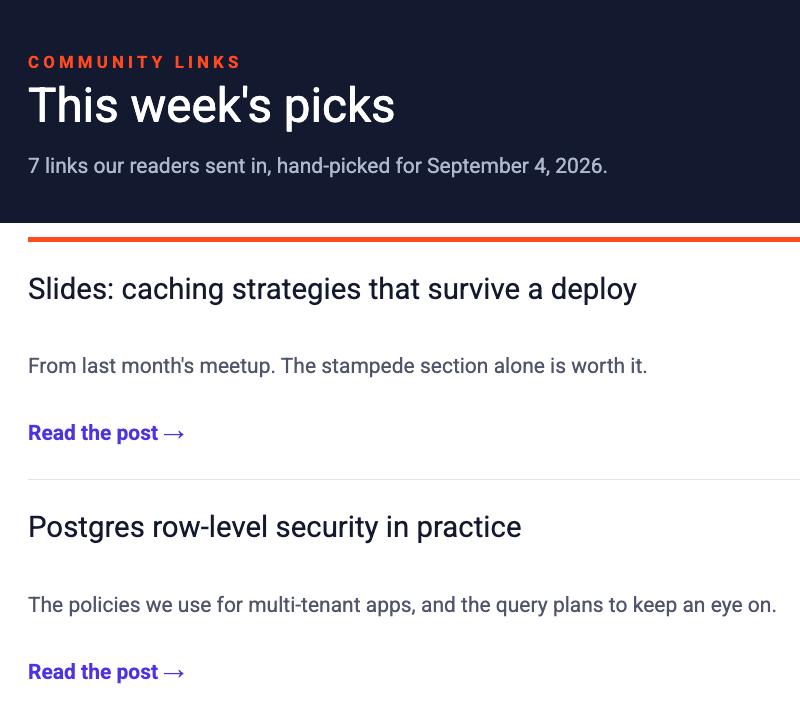
Open the entries of a form and tick the ones that belong in this issue. Run the MailPoet Compose bulk action, and a finished draft is waiting for you in MailPoet. With your header, a section for every entry you picked, and your footer already in place. All that is left is to read it through, tweak to your liking, and send it. No more copy-paste, no rebuilding, no admin work.
Entries that made an issue are marked in the entry list, so the same entry never goes out twice. Changed your mind about a draft? Delete it in MailPoet and its entries are available again for the next issue.
Build the newsletter template once
The newsletter needs a template first, and that is the one piece of real setup. It happens in the MailPoet editor you already use. Put [entry] above one example item and [/entry] below it. Fill the item with the merge tags you already use in notifications, like {Post title:1} and {Description:3}. That is the whole language. Every entry follows your example.
![A MailPoet newsletter with the [entry] and [/entry] markers around a single item built from merge tags.](/assets/mailpoet/img/home-hero-template.png)
Want more? [else] on its own alternates two item styles. Give it a condition, [entry 3="Event"] ... [else 3="Announcement"] ... [else] ... [/entry], and events, announcements, and everything else each get their own look inside one list. One newsletter, as many sections as you like.
Rather skip the setup? Three ready-made templates sit in the Gravity Forms template library:
Install one, and the matching MailPoet newsletter installs with it, markers already placed. Or hand the setup to your AI agent (keep reading).
Automate: ask your AI agent for this week's issue
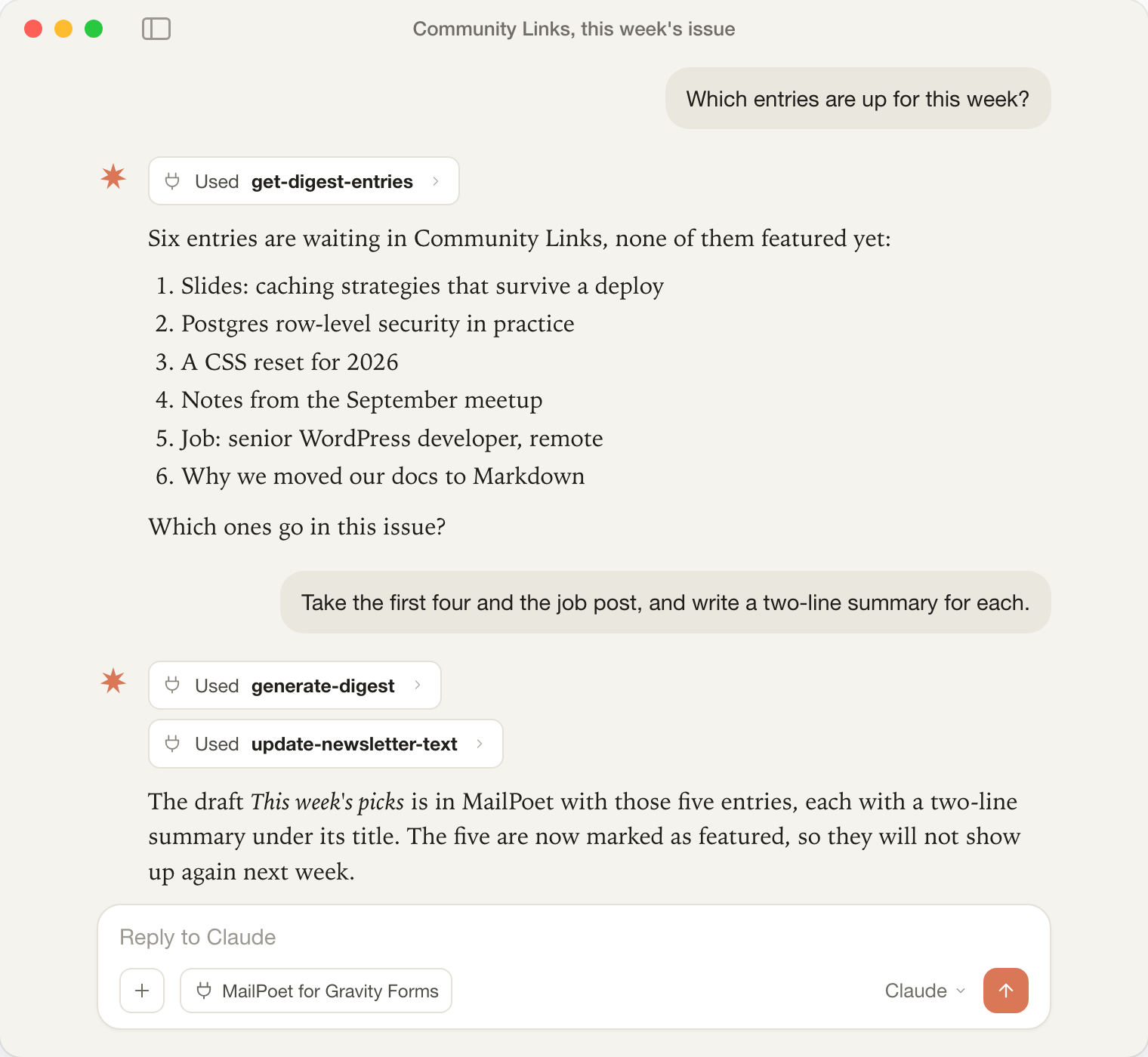
Connect any MCP-able AI agent (Claude, ChatGPT, anything that speaks MCP) and talk to it the way you would talk to a colleague who runs the newsletter.
Which entries are up for this week?
It lists them.
Take the first four and the job post, and write a two-line summary for each.
It builds the draft in MailPoet and writes the summaries.
Send me a preview.
A test email lands in your inbox.
Schedule it for Friday morning.
Done. You never even opened WordPress.
Have a MailPoet template you already like?
Copy the Monthly Update template, point it at the Community Links form, and make it a Compose template.
It duplicates the template, places the [entry] markers, fills in the merge tags for that form's fields, and configures the feed. It reads the built-in syntax guide before it starts, so the markers land where they should. Setup takes minutes.
The same connection covers your subscribers.
Is [email protected] on the Members list?
Add her to Volunteers as well.
Take [email protected] off Members.
Lookups, subscribes, unsubscribes and updates, all from the chat.
Every issue waits for your go-ahead
Everything the agent builds is a draft. Ask it to schedule the issue and a test email lands in your inbox first; the real thing only goes out once you say so. The plugin never contacts an AI service on its own: your connected agent does the work with the access your own account has. Under Forms > Settings, the new MailPoet tab shows your MCP endpoint and lets you hand out the read, write, and send tools one group at a time. Switch them all off and the endpoint is gone.
The AI features need WordPress 6.9 or newer, where the Abilities API lives. The MCP setup guide gets you connected in minutes.
From subscribe checkbox to toolkit
MailPoet for Gravity Forms started as a subscribe checkbox on your form. As of today it covers every step between a form entry and a scheduled issue: Subscribe, Compose, Automate. One plugin, the complete toolkit for MailPoet and Gravity Forms.
Everything you use today keeps working. Your form settings now show two feeds, MailPoet Subscribe and MailPoet Compose, one for each half of the plugin.
1.3.0 is live. Update from your WordPress dashboard and Compose is waiting in your form settings. New here? Grab a license, install a template, and send your first issue this week. Everything that changed is in the changelog.
For the fuller argument behind all of this, read why Gravity Forms entries are the content source MailPoet never had.